
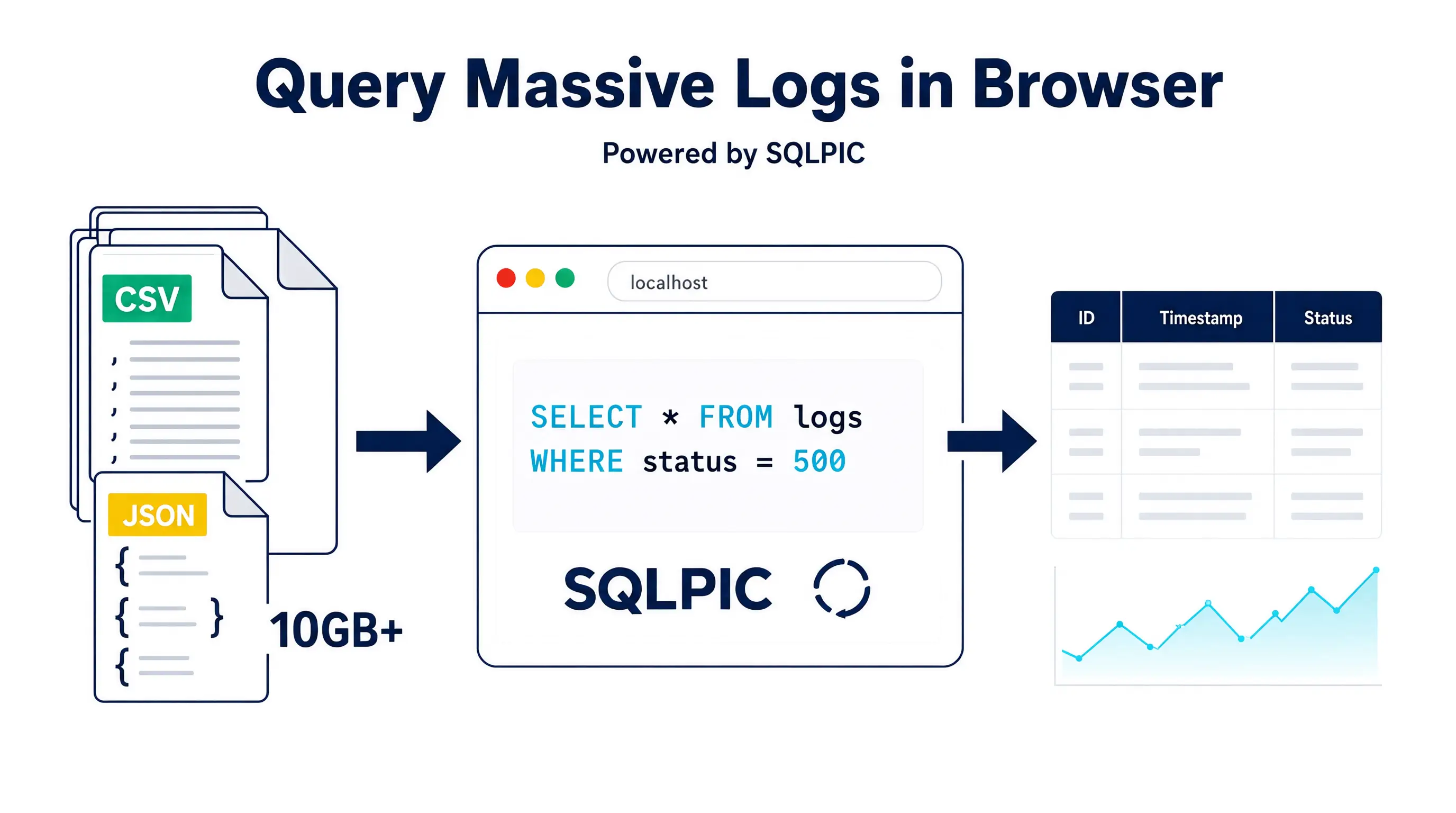
How to Query Massive CSV and JSON Log Files in Your Browser Using SQLPIC
This isn't a futuristic concept anymore. Tools like SQLPIC and QueryEdge have made it possible to query massive CSV and JSON log files entirely client-side. By leveraging WebAssembly and modern browser APIs, you can transform your browser tab into a high-performance, local analytics engine.
But there is a catch. Querying a 10-kilobyte sample file is easy. Querying a 2-gigabyte log file without crashing your browser tab requires a specific set of techniques. This guide will show you exactly how to use SQLPIC to query large flat files in the browser, manage memory limits, and extract insights without ever touching a backend server.
The Shift to Client-Side Log Analysis
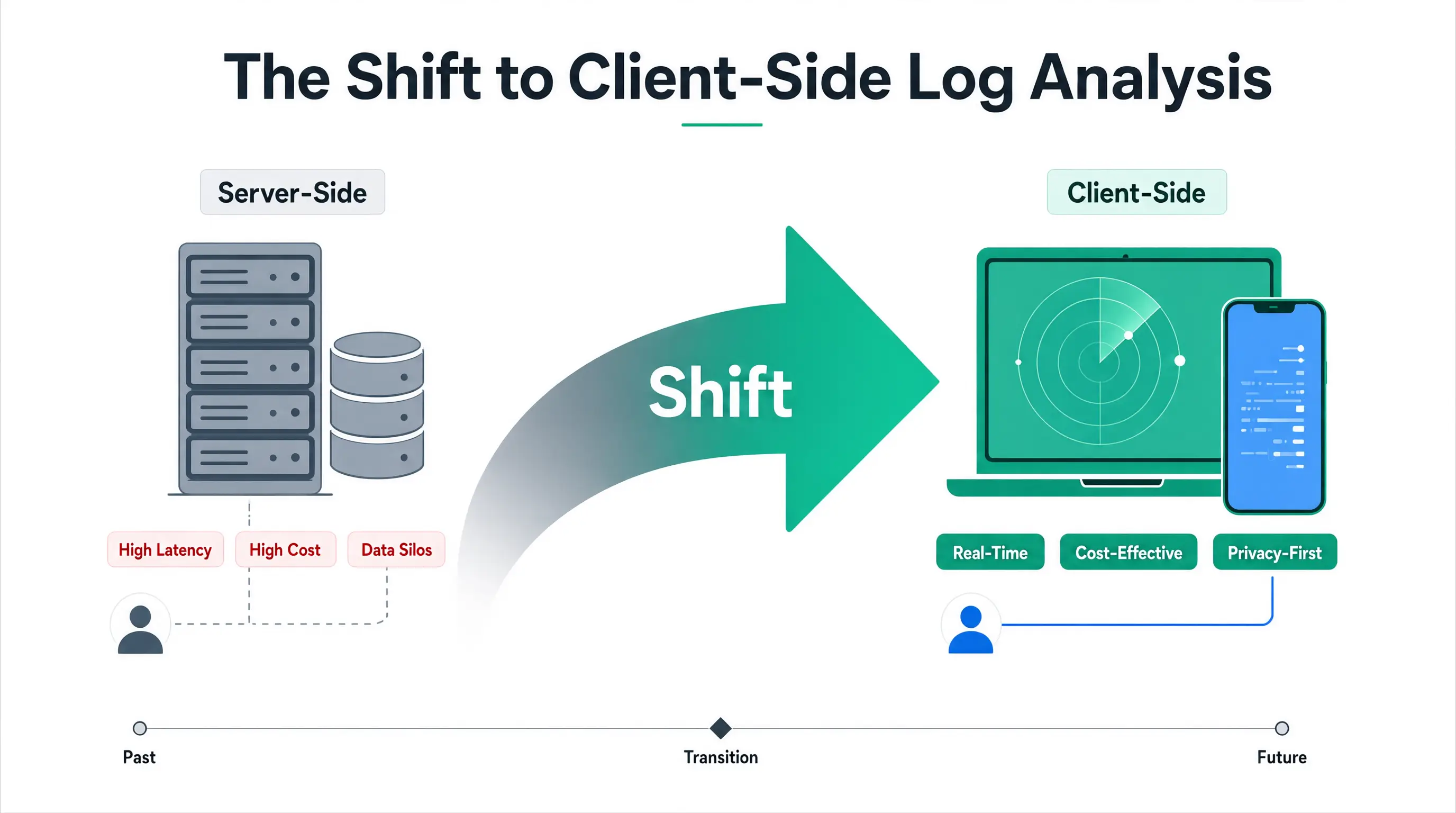
For years, the browser was strictly a rendering engine. If you wanted to process data, you sent it to a server. That paradigm is flipping.
The rise of client-side data processing is driven by three factors: privacy, speed, and cost. When you analyze logs locally, the data never leaves your machine. This is a massive win for compliance teams dealing with GDPR or HIPAA. Furthermore, you eliminate network latency. You aren't waiting for a 1 GB file to upload over a corporate connection; you are reading directly from your local SSD.
SQLPIC sits at the intersection of this shift. It provides a streamlined interface and execution environment for running SQL directly against flat files in the browser. But to use it effectively on large datasets, you need to understand what is actually happening under the hood.
Understanding SQLPIC and the Mechanics of In-Browser SQL
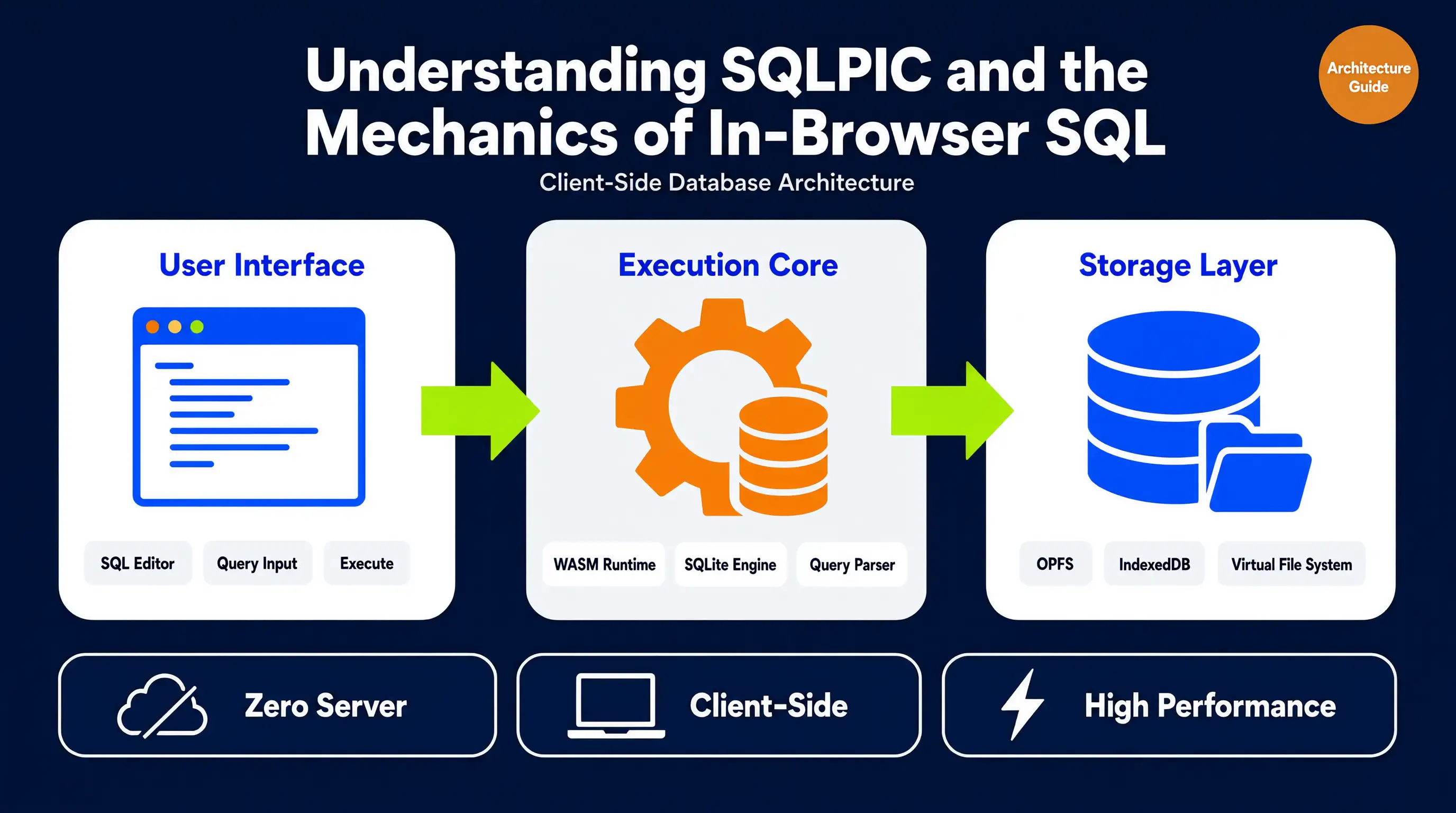
To master SQLPIC, you have to look past the UI and understand the engine. Browsers don't natively speak SQL, and they certainly don't have built-in relational database management systems for flat files.
What SQLPIC Actually Does
SQLPIC acts as an orchestration layer. It takes your raw CSV or JSON files, manages the file input via the browser's File API, and passes that data to an underlying WebAssembly-based SQL engine. It handles the translation between your browser's JavaScript environment and the low-memory, high-speed WASM execution environment.
Think of it as a bridge. You write standard SQL; SQLPIC handles the memory allocation, parsing, and execution, returning the results back to your JavaScript context.
The WebAssembly Engine Under the Hood
The magic of in-browser SQL relies entirely on WebAssembly (WASM). Traditional JavaScript is too slow for parsing millions of rows of JSON. WASM allows developers to compile low-level languages (like C++ or Rust) into a binary format that runs in the browser at near-native speed.
When you use SQLPIC, you are likely interacting with a WASM-compiled version of a database engine (similar to DuckDB or SQLite). This engine allocates a contiguous block of memory in the browser. It reads your file into this memory, builds an in-memory columnar or row-based structure, and executes your query using highly optimized C++ or Rust code.
Understanding this is critical because it dictates your limitations. You aren't bound by JavaScript's garbage collection; you are bound by the WASM linear memory limit.
Step-by-Step: Querying Your Files with SQLPIC
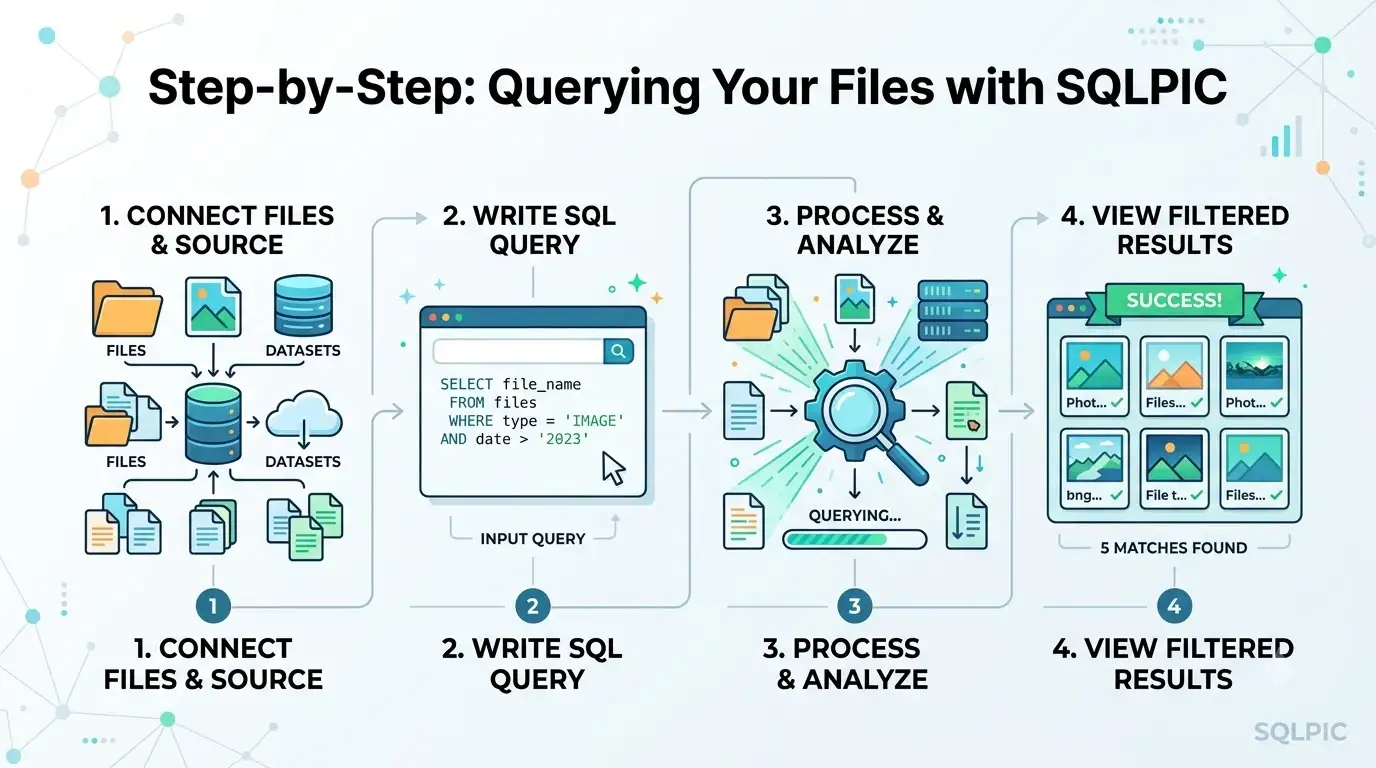
Let’s move from theory to practice. Here is how you actually execute a query against a large log file using SQLPIC.
Preparing CSV and JSON Logs for the Browser
The format of your log file dictates your success. Browsers handle structured, predictable data much better than messy, nested data.
For CSV Files:
Ensure your CSV is strictly formatted. Use a consistent delimiter (comma or tab) and ensure every row has the same number of columns. If your log messages contain commas, make sure they are properly escaped with quotes. A malformed row in a 500 MB CSV can cause the parser to choke and throw an error.
For JSON Files:
Standard, pretty-printed JSON arrays ([{...}, {...}]) are terrible for large log files because the parser has to load the entire structure into memory before it can process anything.
Instead, use NDJSON (Newline Delimited JSON), also known as JSON Lines. Each line is a valid, standalone JSON object.
Bad (Standard JSON):
[
  {"timestamp": "2026-07-31T10:00:00Z", "level": "ERROR", "msg": "Timeout"},
  {"timestamp": "2026-07-31T10:01:00Z", "level": "INFO", "msg": "Retry"}
]
Good (NDJSON):
{"timestamp": "2026-07-31T10:00:00Z", "level": "ERROR", "msg": "Timeout"}
{"timestamp": "2026-07-31T10:01:00Z", "level": "INFO", "msg": "Retry"}
NDJSON allows SQLPIC to stream the file line-by-line, drastically reducing memory overhead.
Loading Data and Executing Your First Query
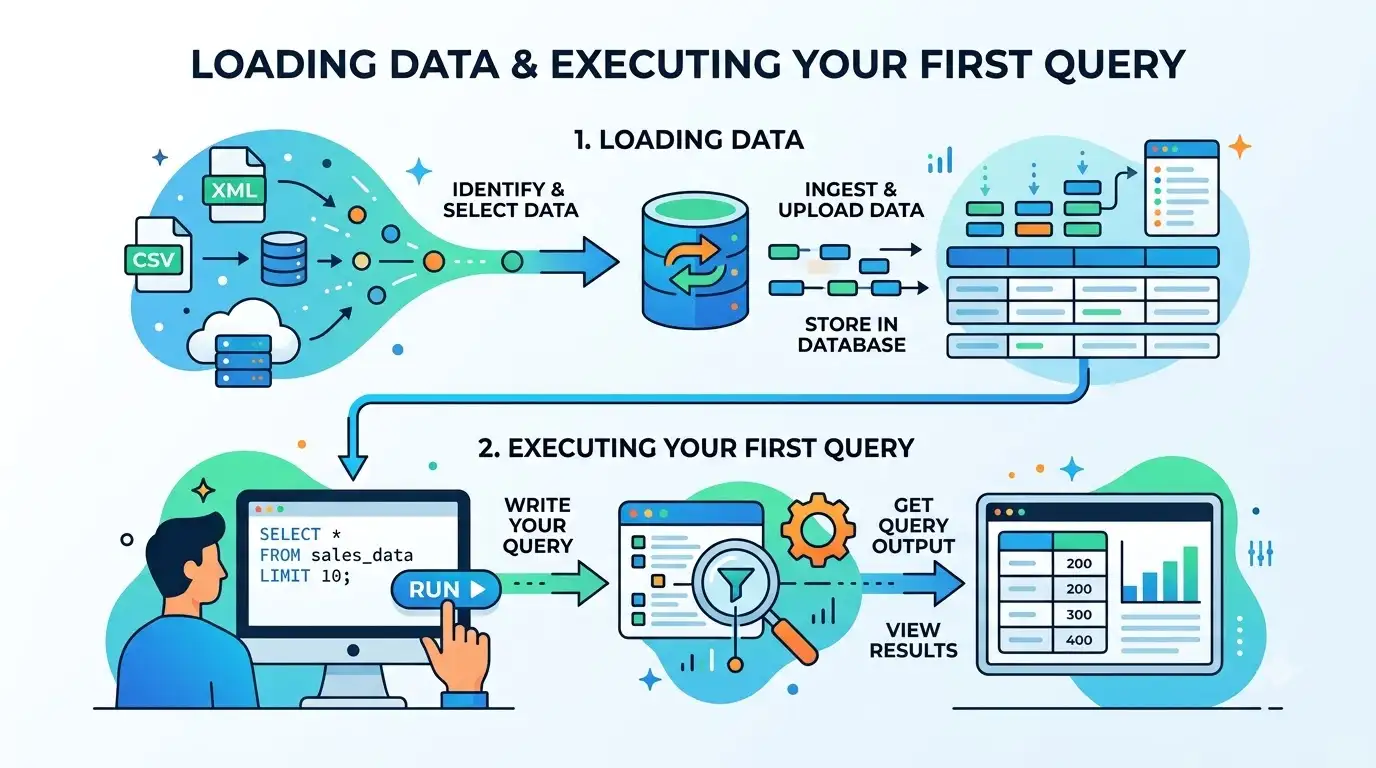
Once your file is formatted, the workflow in SQLPIC is straightforward:
- Initialize the Environment: Open the SQLPIC interface. The WASM engine will initialize and allocate its initial memory heap.
- Import the File: Use the file picker to select your CSV or NDJSON file. SQLPIC will read the file using the browser's FileReader or ReadableStream API.
- Define the Schema (If necessary): While many modern engines infer schemas automatically, large files benefit from explicit schema definition. Tell SQLPIC which columns are strings, integers, or timestamps. This prevents the engine from guessing and wasting CPU cycles.
- Write and Execute: Type your SQL query in the editor and hit run.
A basic query to find all errors in the last hour looks like this:
SELECT timestamp, level, message
FROM logs
WHERE level = 'ERROR'
  AND timestamp > '2026-07-31 09:00:00'
ORDER BY timestamp DESC;
Tackling the "Large File" Problem (Where Most Tools Fail)
This is the section that separates the amateurs from the pros. If you try to load a 2 GB JSON file into a browser using a basic tool, your tab will crash. Here is how to handle massive files with SQLPIC.
Navigating WebAssembly Memory Limits
Browsers impose strict memory limits on individual tabs to prevent the entire browser from crashing if one site goes rogue. Historically, this limit was around 2 GB, though modern 64-bit browsers can push this to 4 GB or more depending on the system's physical RAM.
However, WebAssembly memory is linear. If the WASM engine needs to resize its memory heap to accommodate a large file, it has to copy the entire existing heap to a new, larger block. If you are at 1.8 GB and need 2.2 GB, the browser attempts to allocate a contiguous 2.2 GB block. If the browser's fragmented memory can't find a contiguous block of that size, it throws an Out-Of-Memory (OOM) error, and your tab dies.
The Fix: Don't load the whole file into memory at once. Use SQLPIC’s streaming capabilities (if supported by the underlying engine) or process the file in chunks.
Streaming vs. Bulk Loading: The Right Approach
Bulk loading reads the entire file into a JavaScript string or ArrayBuffer, then passes it to WASM. For a 50 MB file, this is fine. For a 1.5 GB file, it will crash your tab.
Streaming reads the file in small chunks (e.g., 64 KB at a time) using the ReadableStream API.
When using SQLPIC for large files, ensure you are utilizing the streaming import mode. The engine will parse a chunk, insert it into the in-memory database table, and then discard the raw chunk buffer. This keeps your memory footprint relatively flat, regardless of whether the file is 100 MB or 5 GB.
CSV vs. JSON: Performance Realities in the Browser
If you have the choice between exporting your logs as CSV or JSON, choose CSV.
Parsing CSV in WASM is highly optimized. It’s just scanning bytes for commas and newlines. Parsing JSON, however, requires building an Abstract Syntax Tree (AST) and instantiating JavaScript objects for every key-value pair. Even in WASM, JSON parsing is significantly slower and more memory-intensive than CSV parsing.
If you must use JSON, ensure it is flat. Nested JSON objects (e.g., {"user": {"id": 1, "name": "John"}}) require complex mapping to flatten into relational SQL columns, which adds massive overhead.
Advanced Querying Techniques for Log Analysis
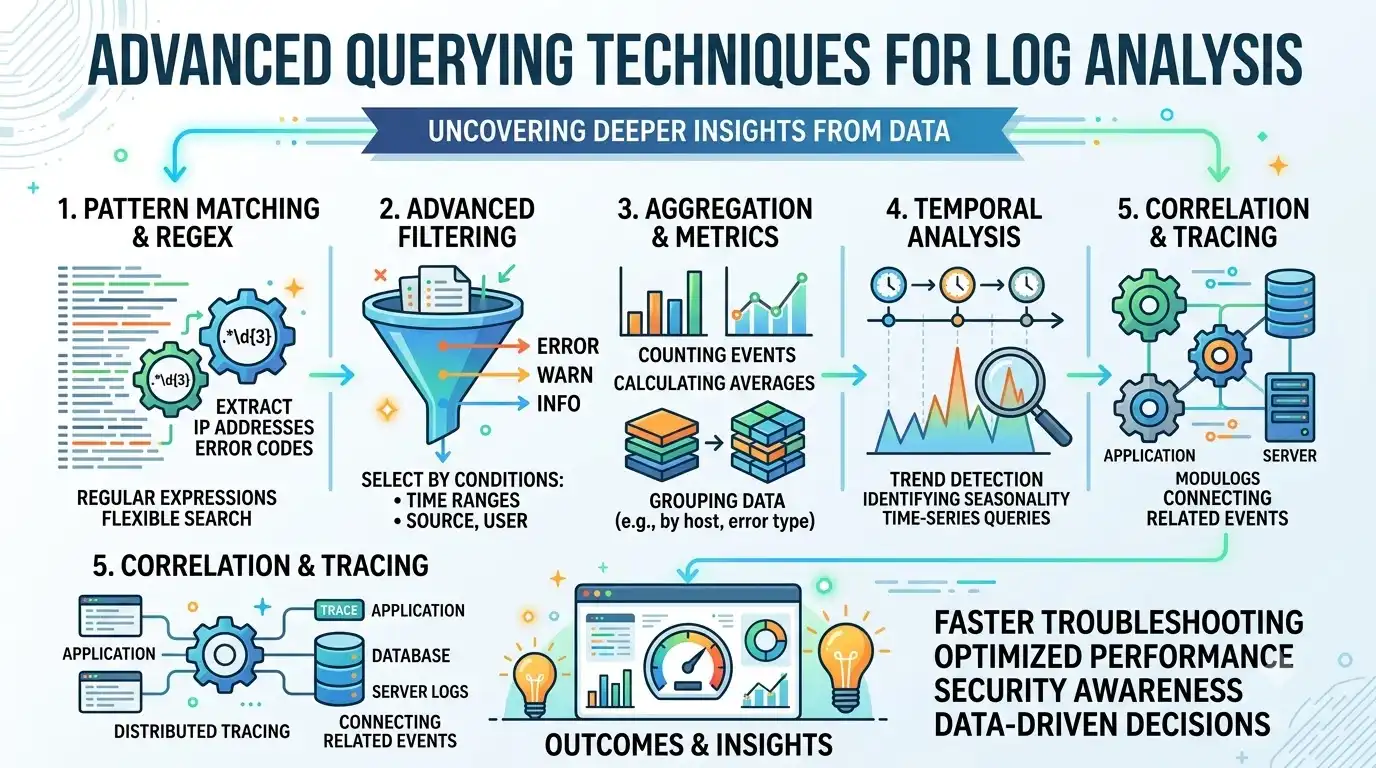
Once your data is loaded, SQLPIC allows you to use standard SQL. But log analysis requires more than just SELECT and WHERE. Here are advanced techniques to get the most out of your client-side engine.
Time-Series and Window Functions
Logs are inherently time-series data. You often need to calculate the time delta between events. Modern in-browser SQL engines support window functions.
To find the time difference between consecutive error logs:
SELECT
    timestamp,
    message,
    timestamp - LAG(timestamp) OVER (ORDER BY timestamp) AS time_since_last_error
FROM logs
WHERE level = 'ERROR'
ORDER BY timestamp;
Note: Ensure your timestamp column is cast to a proper TIMESTAMP or DATETIME type during import, otherwise the math will fail.
Extracting Data with Regex in SQL
Log messages are often unstructured strings. You might need to extract an IP address or a specific error code from the message column.
If the underlying engine supports it (like DuckDB), you can use regex extraction directly in your SQL:
SELECT
    timestamp,
    regexp_extract(message, 'IP: ([0-9]{1,3}\.[0-9]{1,3}\.[0-9]{1,3}\.[0-9]{1,3})', 1) AS extracted_ip
FROM logs
WHERE message LIKE '%IP:%';
This pushes the heavy lifting of string manipulation down into the WASM engine, which is exponentially faster than doing it in JavaScript after the fact.
Exporting and Visualizing Results
You’ve found the 50 rows that explain the production crash. Now what? SQLPIC should allow you to export the query results. You can export the filtered dataset back to CSV, or directly to JSON to feed into a browser-based charting library like Chart.js or D3.js. This creates a complete, zero-backend analytics pipeline.
Preventing UI Freezes: The Role of Web Workers
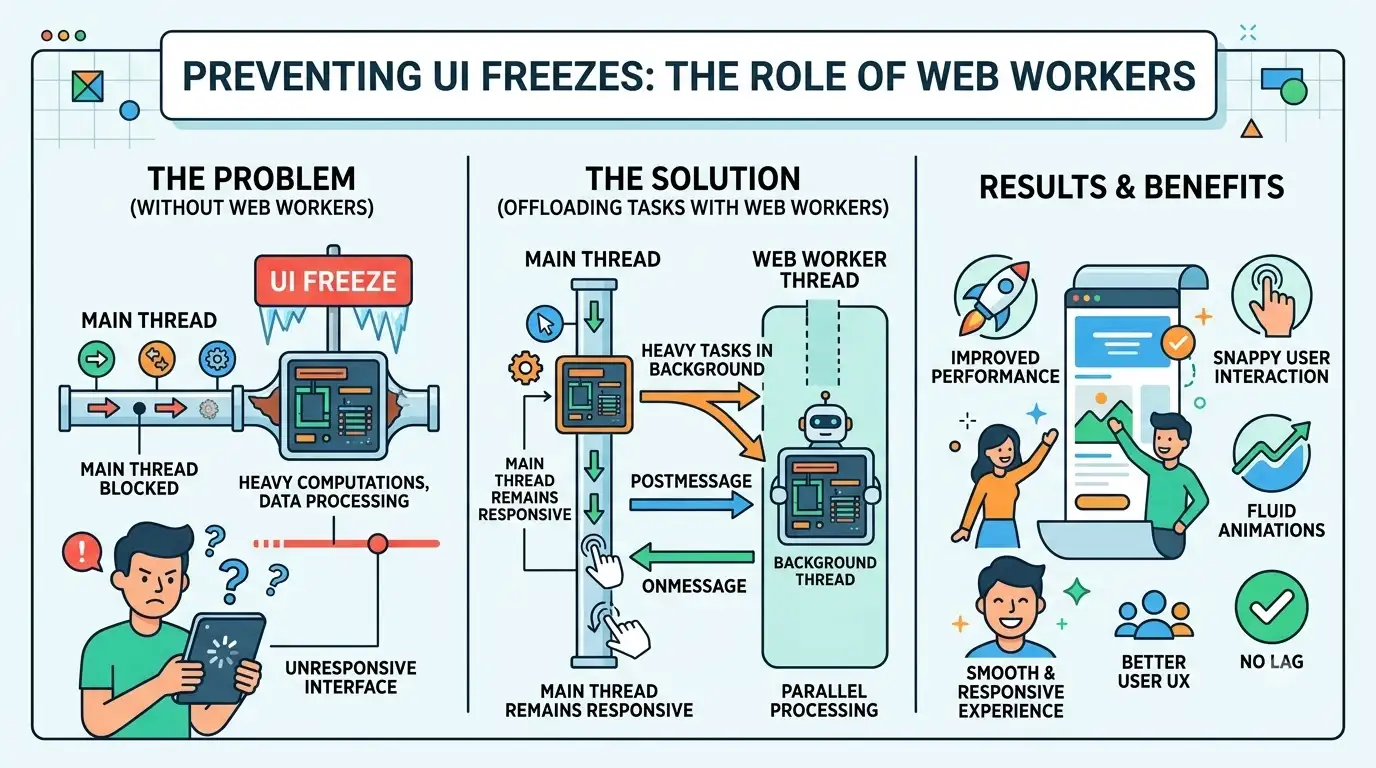
Here is a harsh reality of browser-based processing: JavaScript is single-threaded. If you run a complex GROUP BY query on 5 million rows on the main thread, your browser UI will freeze. The progress bar will stop, the text won't highlight, and the user will think the tab has crashed.
To build or use a robust SQLPIC implementation, the heavy lifting must be offloaded to a Web Worker.
A Web Worker runs in a separate background thread. When you click "Execute Query" in SQLPIC, the UI thread should send a message to the Worker containing the SQL string. The Worker passes this to the WASM engine, executes it, and sends the results back to the main thread.
This keeps the main thread entirely free to handle UI updates, render progress bars, and respond to user clicks. If you are building a custom wrapper around SQLPIC, implementing Web Workers isn't optional for large files; it's mandatory for a usable application.
SQLPIC vs. The Alternatives: A Technical Comparison
SQLPIC isn't the only player in the in-browser SQL space. Depending on your exact needs, you might want to look at the alternatives. Here is how they stack up for large file log analysis.
| Feature / Tool | SQLPIC | DuckDB-WASM | AlaSQL | SQL.js |
|---|---|---|---|---|
| Primary Engine | Specialized UI/WASM wrapper | DuckDB (C++) | Custom JS Engine | SQLite (C) |
| Max File Size | High (Optimized for logs) | Very High (Columnar) | Low (Struggles >100MB) | Medium (Row-based) |
| Streaming Support | Yes (via underlying engine) | Yes (Excellent) | No (Bulk load only) | No (Bulk load only) |
| JSON/NDJSON | Good | Excellent | Poor | Good |
| Complex Analytics | High | Very High | Low | Medium |
| Learning Curve | Low (UI focused) | Medium (API focused) | Low | High (Requires setup) |
The Verdict: If you want a turnkey UI for log analysis, SQLPIC is highly optimized for the workflow. If you are building a custom data app and need raw, uncompromising performance on massive datasets, DuckDB-WASM is the undisputed king of the browser. AlaSQL is best left for small, simple datasets where you don't want to deal with WASM compilation.
Future Trends in Browser-Based Data Processing
The capabilities of tools like SQLPIC are only going to expand. Here is what is on the horizon for client-side data processing:
- WebGPU for Analytics: While WebAssembly handles CPU-bound tasks, WebGPU is opening the door for GPU-accelerated data processing in the browser. Expect future SQL engines to offload massive JOIN and GROUP BY operations directly to the user's graphics card.
- OPFS (Origin Private File System): Browsers are introducing OPFS, which provides a high-performance, file-system-like API for web apps. This will allow tools like SQLPIC to cache parsed databases locally, meaning you won't have to re-parse a 2 GB log file every time you refresh the page.
- Federated Querying: Future iterations will likely allow you to query a local CSV file and a remote REST API in the same SQL statement, blending local and cloud data seamlessly without a backend.
Key Takeaways
- Client-side is viable: You can securely and quickly query massive log files directly in the browser using tools like SQLPIC, eliminating server costs and data privacy risks.
- Format matters: Always use NDJSON instead of standard JSON arrays, and ensure CSVs are strictly formatted to prevent parser failures.
- Memory is the bottleneck: WebAssembly memory limits are your biggest enemy. Use streaming imports and avoid loading entire massive files into memory at once.
- Offload the UI: Always use Web Workers to execute queries. Running heavy SQL on the main thread will freeze the browser and ruin the user experience.
- Push logic to the engine: Use advanced SQL features like regex extraction and window functions inside the WASM engine rather than processing the results in JavaScript.
Summary
Querying large CSV and JSON log files in the browser using SQLPIC represents a massive leap forward for developers and data analysts. By moving the compute to the client, we gain speed, privacy, and simplicity. However, the browser is a constrained environment. Success requires more than just knowing SQL; it requires understanding WebAssembly memory limits, leveraging streaming parsers, formatting your flat files correctly, and utilizing Web Workers to keep the UI responsive.
Master these mechanics, and you will never need to spin up a temporary cloud database just to investigate a production error again.